> ## Documentation Index
> Fetch the complete documentation index at: https://docs.monterey.ai/llms.txt
> Use this file to discover all available pages before exploring further.
# External Integrations
> Analyzing data from GitHub, Jira, Linear and web sources
# External Integrations
Ask Monty can pull in data from external sources to give you a complete picture of your product and customer feedback, including development work, issue tracking, and public discourse.
## GitHub Integration
### What Can Monty Analyze?
* **GitHub Issues**: Bug reports, feature requests, discussions
* **Pull Requests**: Code changes, reviews, merge status
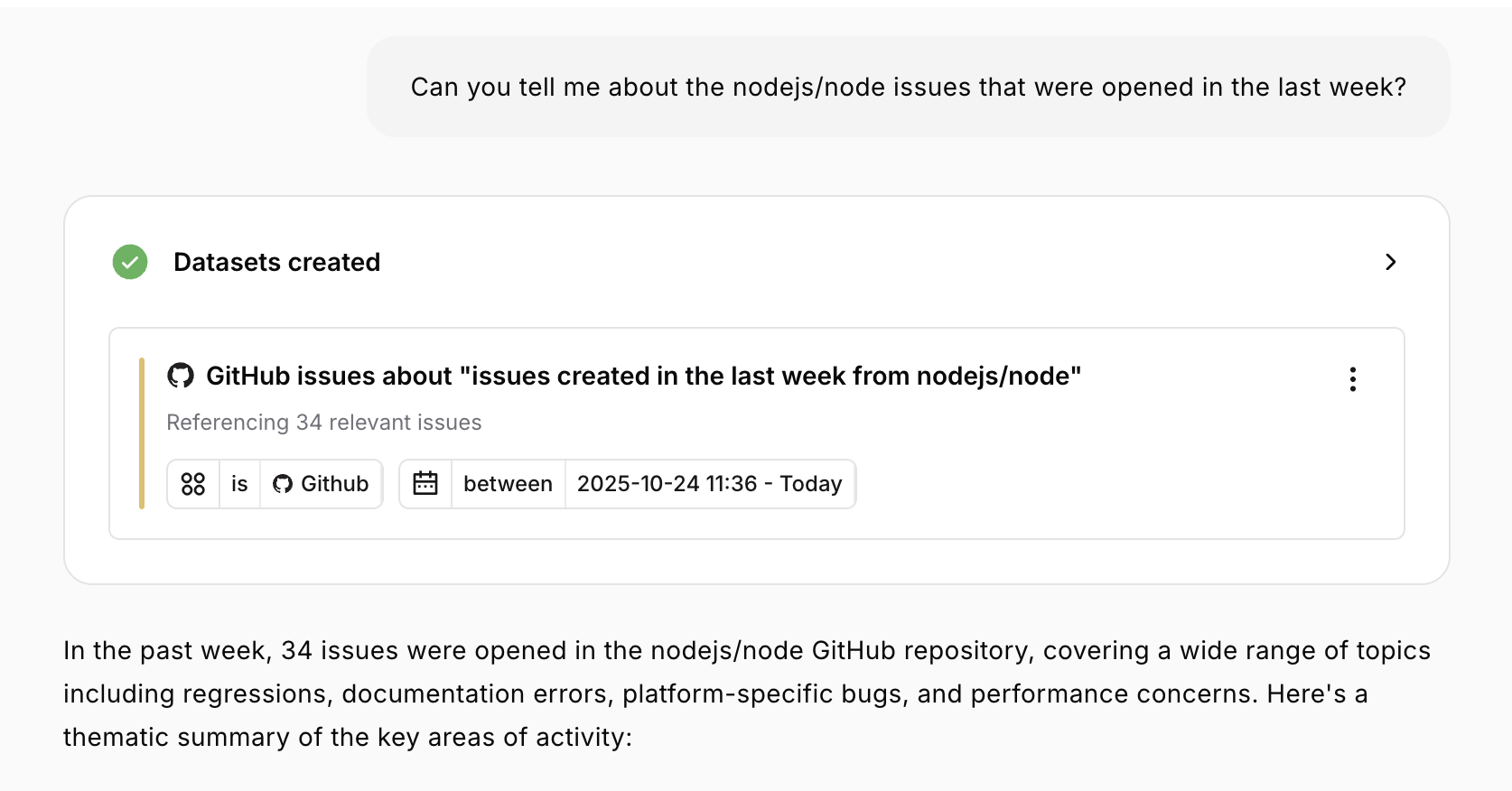 ### Asking About GitHub
```
"Summarize GitHub issues from the past week"
"What pull requests were merged last month?"
"Show me open issues labeled 'bug'"
"List recent GitHub activity"
```
**Time range options:**
* Maximum lookback: 60 days
* Can specify: "last week", "past 30 days", "this month"
### GitHub Data Fields
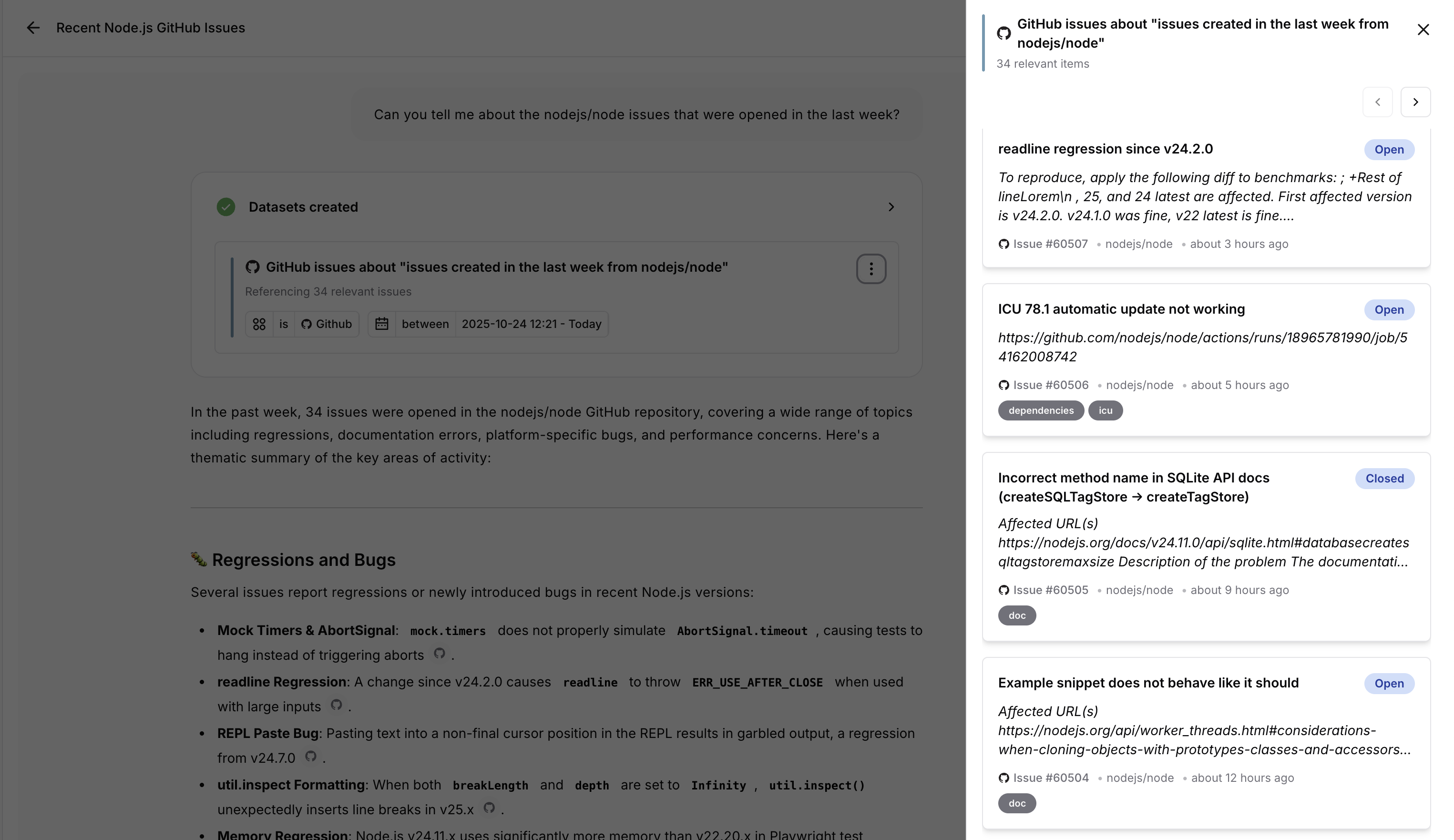
For each issue/PR, Monty has access to:
* **Title and description**
* **State**: Open, closed, merged (for PRs)
* **Labels**: bug, enhancement, documentation, etc.
* **Dates**: Created, updated, closed
* **Key**: Issue/PR number
* **URL**: Link to the item
* **Assignees and authors** (when available)
### Asking About GitHub
```
"Summarize GitHub issues from the past week"
"What pull requests were merged last month?"
"Show me open issues labeled 'bug'"
"List recent GitHub activity"
```
**Time range options:**
* Maximum lookback: 60 days
* Can specify: "last week", "past 30 days", "this month"
### GitHub Data Fields
For each issue/PR, Monty has access to:
* **Title and description**
* **State**: Open, closed, merged (for PRs)
* **Labels**: bug, enhancement, documentation, etc.
* **Dates**: Created, updated, closed
* **Key**: Issue/PR number
* **URL**: Link to the item
* **Assignees and authors** (when available)
 ### Use Cases
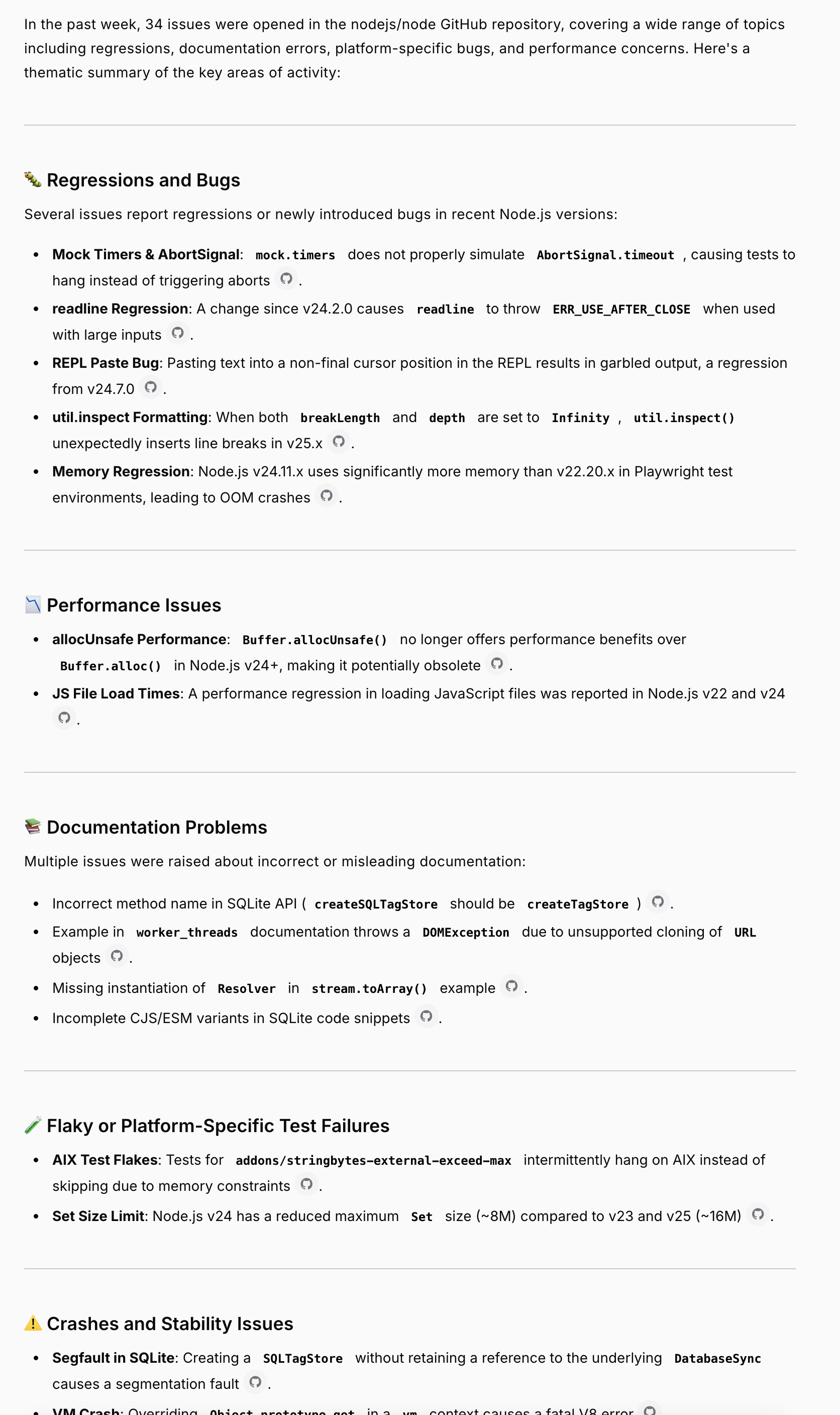
GitHub integration excels at creating development summaries. Ask for an executive summary of the team's work over the past month, and Monty pulls all issues and PRs to summarize what's been completed, what's in progress, and what's planned. This is particularly useful for sprint retrospectives—"Summarize closed GitHub issues from the last 2 weeks"—giving you a quick view of completed work.
For bug tracking and feature planning, query open issues directly: "What bugs are currently open in GitHub?" or "Show me the most recent feature requests." These queries help with prioritization and roadmap planning, and you can export the results for further analysis.
### Use Cases
GitHub integration excels at creating development summaries. Ask for an executive summary of the team's work over the past month, and Monty pulls all issues and PRs to summarize what's been completed, what's in progress, and what's planned. This is particularly useful for sprint retrospectives—"Summarize closed GitHub issues from the last 2 weeks"—giving you a quick view of completed work.
For bug tracking and feature planning, query open issues directly: "What bugs are currently open in GitHub?" or "Show me the most recent feature requests." These queries help with prioritization and roadmap planning, and you can export the results for further analysis.
 ### Combining with Customer Feedback
Link customer feedback to development work:
```
"Compare customer bug reports to open GitHub issues"
→ Dataset 1: Customer-reported bugs
→ Dataset 2: Open GitHub bug issues
→ Analysis shows which customer issues have corresponding dev work
```
**Powerful for:**
* Prioritizing GitHub issues based on customer pain
* Checking if customer requests have tickets
* Reporting back to customers on fix status
## Jira Integration
### What Can Monty Analyze?
* **Jira Issues**: Stories, bugs, tasks, epics
* **Status tracking**: To-do, in progress, done
* **Sprint information**: Current and past sprint work
### Combining with Customer Feedback
Link customer feedback to development work:
```
"Compare customer bug reports to open GitHub issues"
→ Dataset 1: Customer-reported bugs
→ Dataset 2: Open GitHub bug issues
→ Analysis shows which customer issues have corresponding dev work
```
**Powerful for:**
* Prioritizing GitHub issues based on customer pain
* Checking if customer requests have tickets
* Reporting back to customers on fix status
## Jira Integration
### What Can Monty Analyze?
* **Jira Issues**: Stories, bugs, tasks, epics
* **Status tracking**: To-do, in progress, done
* **Sprint information**: Current and past sprint work
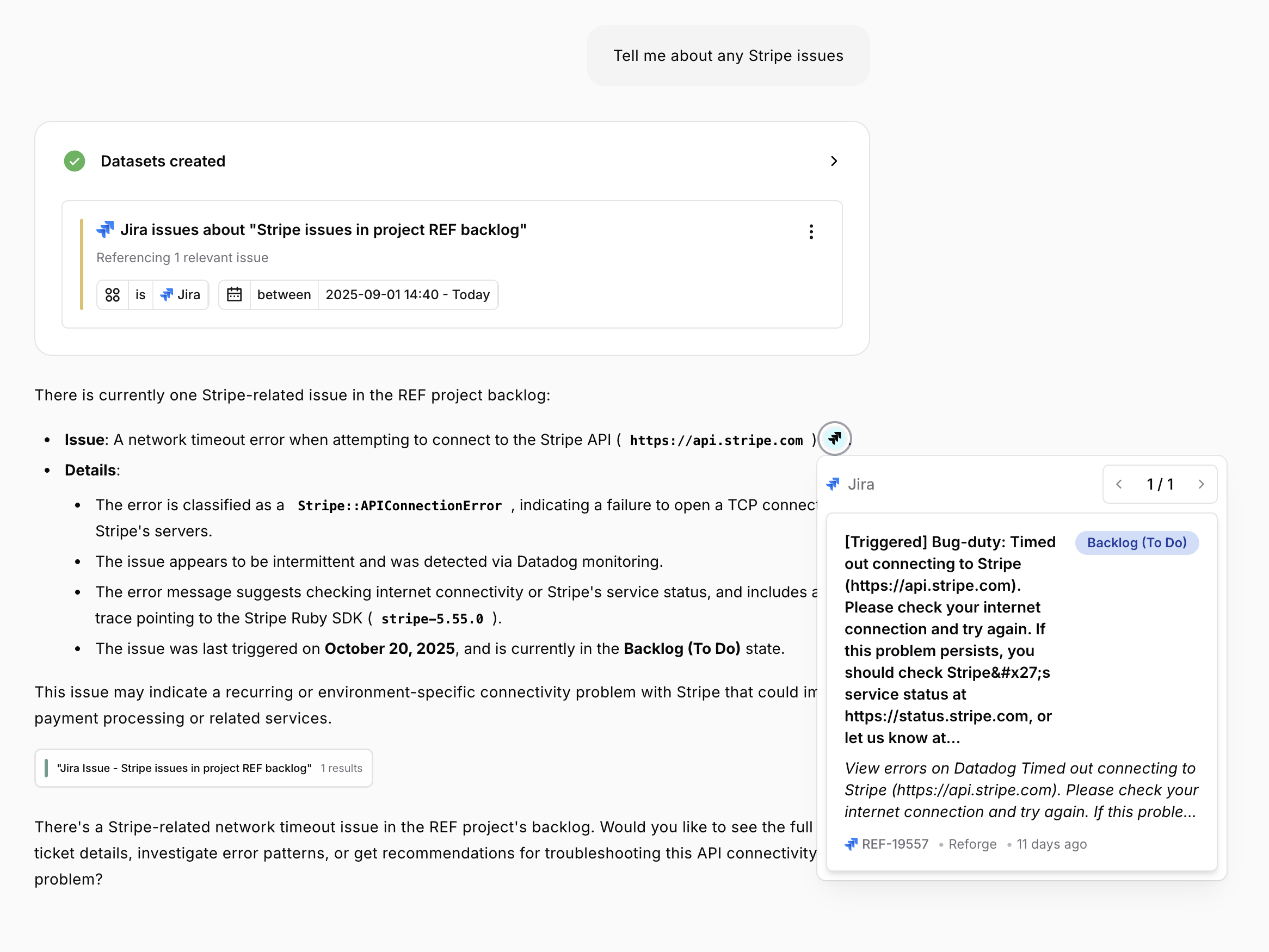
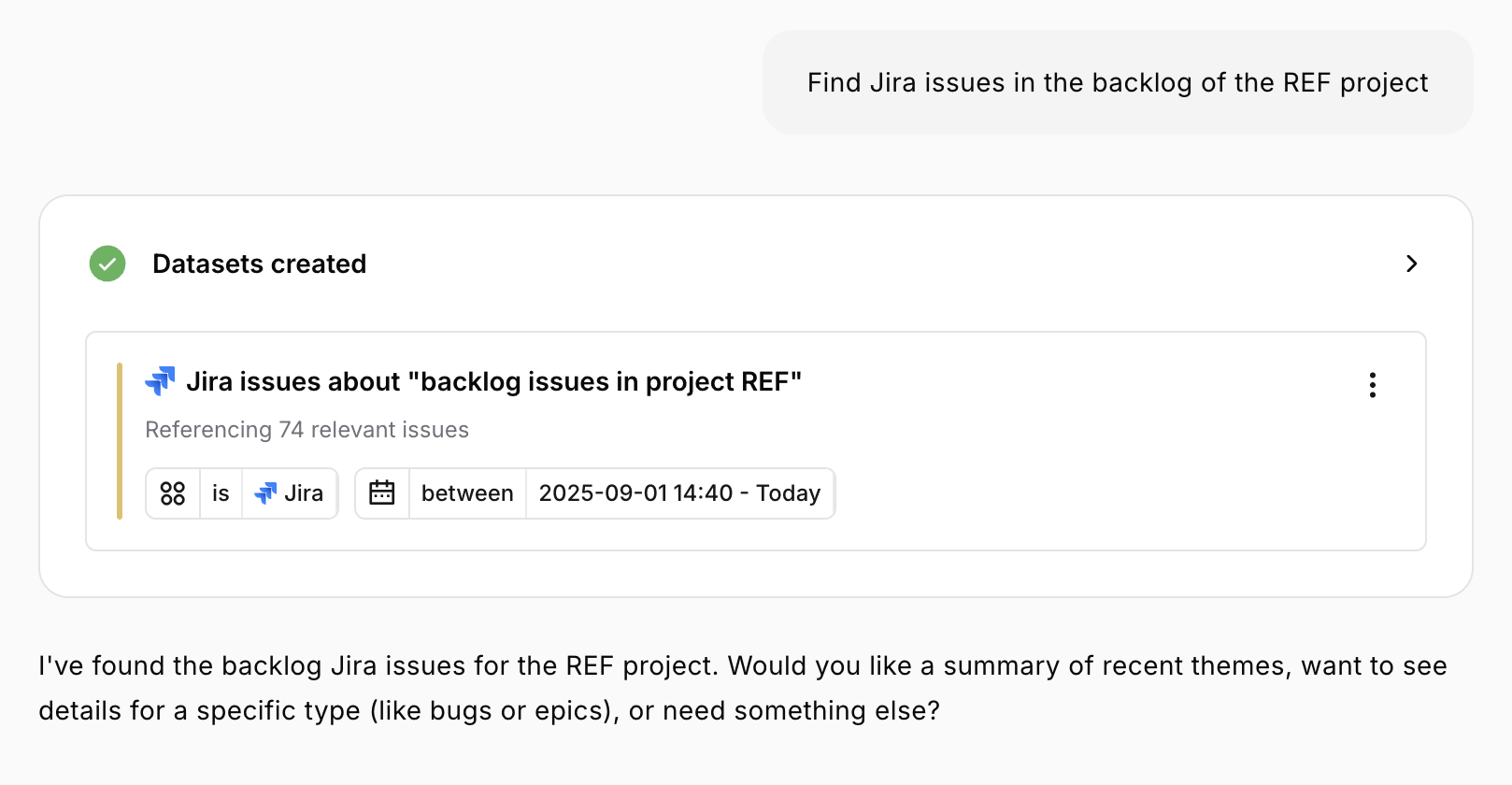 ### Asking About Jira
```
"Summarize Jira tickets from the past month"
"What issues are currently in progress?"
"Show me completed work from this sprint"
"List open bugs in Jira"
```
**Time range options:**
* Maximum lookback: 60 days
* Can specify: "last week", "this sprint", "past 30 days"
### Jira Data Fields
For each issue, Monty has access to:
* **Summary and description**
* **Issue type**: Bug, story, task, epic
* **Status**: To-do, in progress, done, etc.
* **Priority**: High, medium, low
* **Dates**: Created, updated, completed
* **Key**: Issue ID (e.g., PROJ-123)
* **URL**: Link to the Jira ticket
* **Assignee and reporter**
* **Labels and components**
### Asking About Jira
```
"Summarize Jira tickets from the past month"
"What issues are currently in progress?"
"Show me completed work from this sprint"
"List open bugs in Jira"
```
**Time range options:**
* Maximum lookback: 60 days
* Can specify: "last week", "this sprint", "past 30 days"
### Jira Data Fields
For each issue, Monty has access to:
* **Summary and description**
* **Issue type**: Bug, story, task, epic
* **Status**: To-do, in progress, done, etc.
* **Priority**: High, medium, low
* **Dates**: Created, updated, completed
* **Key**: Issue ID (e.g., PROJ-123)
* **URL**: Link to the Jira ticket
* **Assignee and reporter**
* **Labels and components**
 ### Use Cases
**Team Status Reports:**
```
"What work has the team completed in the past 2 weeks?"
→ Pulls completed Jira issues
→ Perfect for status updates to leadership
```
**Sprint Summaries:**
```
"Summarize our current sprint work"
→ Shows in-progress and completed items
→ Great for daily standups or sprint reviews
```
**Bug Analysis:**
```
"How many critical bugs are open right now?"
→ Filters to high-priority bugs
→ Helps with triage and planning
```
**Roadmap Alignment:**
```
"What features are we building this quarter?"
→ Shows feature/story tickets
→ Aligns with product roadmap discussions
```
### Combining with Feedback
Connect development work to customer needs:
```
"Compare feature requests from customers to our Jira roadmap"
→ Dataset 1: Customer feature requests
→ Dataset 2: Jira feature tickets
→ Shows gaps and alignments
```
## Linear Integration
### What Can Monty Analyze?
* **Linear issues**: Stories, bugs, tasks, projects
* **Workflow states**: Team-specific states (backlog, in progress, done, custom)
* **Cycles**: Current and past cycles by team or number
* **Priority + labels**: Structured filters for urgency and tags
* **Teams & assignees**: Exact matches on team keys and user names
### Use Cases
**Team Status Reports:**
```
"What work has the team completed in the past 2 weeks?"
→ Pulls completed Jira issues
→ Perfect for status updates to leadership
```
**Sprint Summaries:**
```
"Summarize our current sprint work"
→ Shows in-progress and completed items
→ Great for daily standups or sprint reviews
```
**Bug Analysis:**
```
"How many critical bugs are open right now?"
→ Filters to high-priority bugs
→ Helps with triage and planning
```
**Roadmap Alignment:**
```
"What features are we building this quarter?"
→ Shows feature/story tickets
→ Aligns with product roadmap discussions
```
### Combining with Feedback
Connect development work to customer needs:
```
"Compare feature requests from customers to our Jira roadmap"
→ Dataset 1: Customer feature requests
→ Dataset 2: Jira feature tickets
→ Shows gaps and alignments
```
## Linear Integration
### What Can Monty Analyze?
* **Linear issues**: Stories, bugs, tasks, projects
* **Workflow states**: Team-specific states (backlog, in progress, done, custom)
* **Cycles**: Current and past cycles by team or number
* **Priority + labels**: Structured filters for urgency and tags
* **Teams & assignees**: Exact matches on team keys and user names
 ### Asking About Linear
```
"Show Linear issues for the Research team updated this week"
"Summarize high-priority Linear bugs that are labelled regression"
"Shoe me low-priority issues from the Research team that are in the Backlog"
"List Linear tickets labeled onboarding"
"What did we complete in Linear in cycle 1?"
```
**Time range options:**
* Maximum lookback: 60 days
* Date filters can target `createdAt` or `updatedAt` depending on whether you ask for new issues or recently updated work
### Linear Data Fields
For each Linear issue, Monty has access to:
* **Title and description**
* **Workflow state**: Team-aware state matching (e.g., "In Review", "Blocked")
* **Priority**: Mapped to your Linear priority scale
* **Labels**: Single or multiple labels mentioned in your question
* **Projects and teams**: Exact project name matches or combinations
* **Cycles**: Cycle name or number, including "current cycle" detection
* **Assignee information**
* **Dates**: Created and updated timestamps (60-day rolling window)
* **URLs and issue identifiers**
Monty translates natural language into Linear filters—matching teams, workflow states, labels, cycles, and priorities only when they exist in your workspace. Ambiguous references remain unfiltered to avoid incorrect assumptions, and “recently updated” questions automatically switch to the `updatedAt` field.
### Use Cases
**Team Health Checks:**
```
"Summarize Linear tickets for team Platform updated in the last 14 days"
→ Filters by team key and updatedAt
→ Perfect for weekly team reviews
```
**Cycle Reviews:**
```
"What work is in the current Linear cycle?"
→ Identifies the active cycle per team
→ Surfaces in-progress and completed issues
```
**Bug & Priority Triage:**
```
"Show high-priority Linear bugs assigned to Alex"
→ Matches assignee, priority label, and issue label
→ Ideal for daily standups
```
**Roadmap Tracking:**
```
"List Linear issues for Project Mercury that are blocked"
→ Combines project name with workflow state
→ Supports cross-functional reporting
```
### Combining with Feedback
```
"Compare customer bug reports to Linear issues labeled 'payments'"
→ Dataset 1: Customer bug feedback
→ Dataset 2: Linear bugs filtered by label and state
→ Highlights which customer-reported issues have tickets
```
Use Linear data alongside feedback to validate whether high-pain themes already have engineering coverage, identify gaps, and ensure Monty’s summaries cover both customer voice and delivery progress.
## Web Search
### What Can Monty Search?
Monty can search the web for:
* News articles about your product
* Public discussions and reviews
* Competitor information
* Industry trends
* Blog posts and social mentions
### Asking About Linear
```
"Show Linear issues for the Research team updated this week"
"Summarize high-priority Linear bugs that are labelled regression"
"Shoe me low-priority issues from the Research team that are in the Backlog"
"List Linear tickets labeled onboarding"
"What did we complete in Linear in cycle 1?"
```
**Time range options:**
* Maximum lookback: 60 days
* Date filters can target `createdAt` or `updatedAt` depending on whether you ask for new issues or recently updated work
### Linear Data Fields
For each Linear issue, Monty has access to:
* **Title and description**
* **Workflow state**: Team-aware state matching (e.g., "In Review", "Blocked")
* **Priority**: Mapped to your Linear priority scale
* **Labels**: Single or multiple labels mentioned in your question
* **Projects and teams**: Exact project name matches or combinations
* **Cycles**: Cycle name or number, including "current cycle" detection
* **Assignee information**
* **Dates**: Created and updated timestamps (60-day rolling window)
* **URLs and issue identifiers**
Monty translates natural language into Linear filters—matching teams, workflow states, labels, cycles, and priorities only when they exist in your workspace. Ambiguous references remain unfiltered to avoid incorrect assumptions, and “recently updated” questions automatically switch to the `updatedAt` field.
### Use Cases
**Team Health Checks:**
```
"Summarize Linear tickets for team Platform updated in the last 14 days"
→ Filters by team key and updatedAt
→ Perfect for weekly team reviews
```
**Cycle Reviews:**
```
"What work is in the current Linear cycle?"
→ Identifies the active cycle per team
→ Surfaces in-progress and completed issues
```
**Bug & Priority Triage:**
```
"Show high-priority Linear bugs assigned to Alex"
→ Matches assignee, priority label, and issue label
→ Ideal for daily standups
```
**Roadmap Tracking:**
```
"List Linear issues for Project Mercury that are blocked"
→ Combines project name with workflow state
→ Supports cross-functional reporting
```
### Combining with Feedback
```
"Compare customer bug reports to Linear issues labeled 'payments'"
→ Dataset 1: Customer bug feedback
→ Dataset 2: Linear bugs filtered by label and state
→ Highlights which customer-reported issues have tickets
```
Use Linear data alongside feedback to validate whether high-pain themes already have engineering coverage, identify gaps, and ensure Monty’s summaries cover both customer voice and delivery progress.
## Web Search
### What Can Monty Search?
Monty can search the web for:
* News articles about your product
* Public discussions and reviews
* Competitor information
* Industry trends
* Blog posts and social mentions
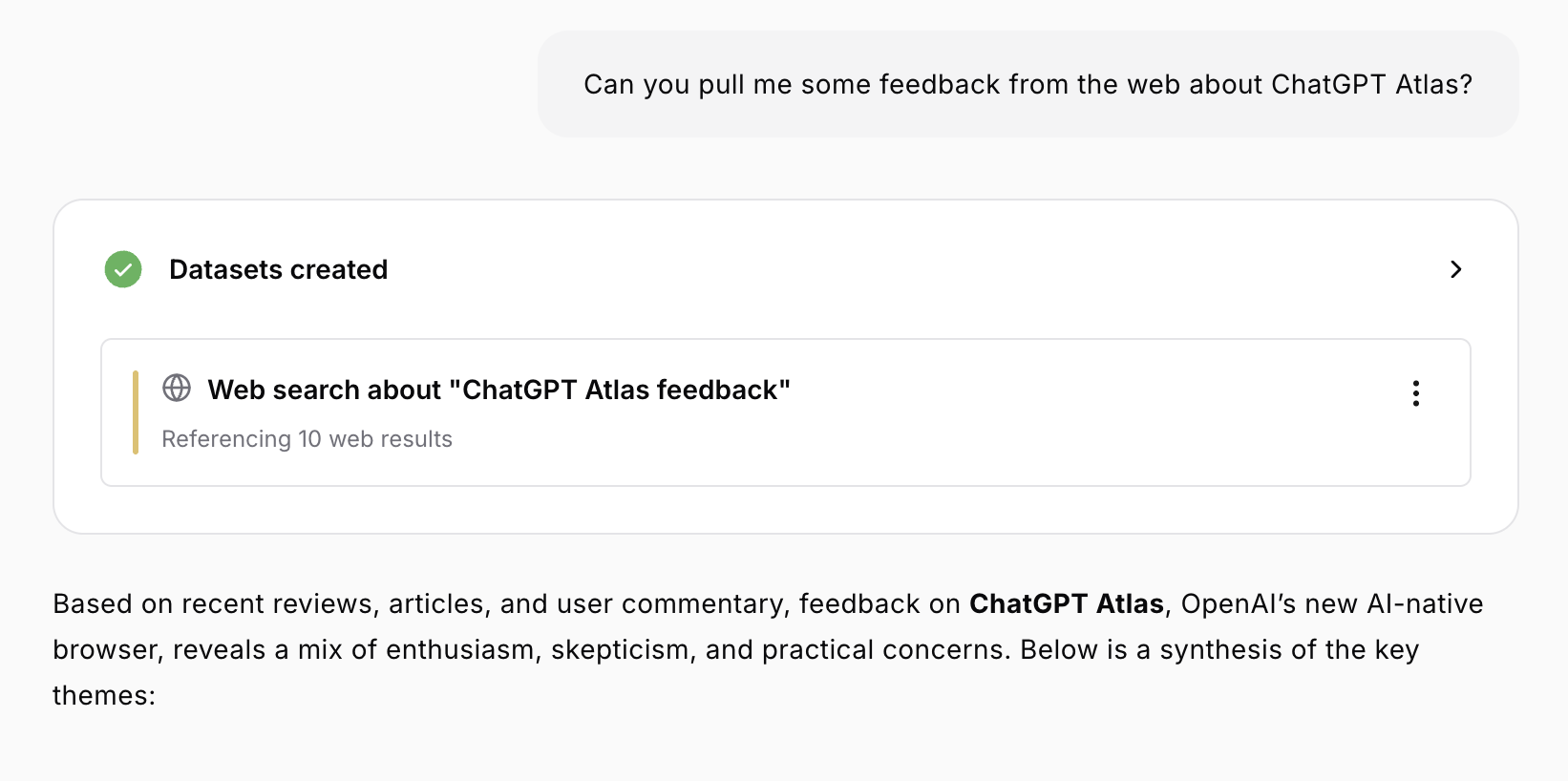 ### Asking About Web Content
```
"What has the news said about our recent product launch?"
"How is our product being discussed online?"
"Search the web for mentions of [feature]"
"What are people saying about [competitor] online?"
```
### Web Search Data
Results include:
* **Page titles**
* **Highlighted excerpts**: Most relevant passages
* **URLs**: Links to sources
* **Published dates**: When content was created
* **Relevance scores**: How well each result matches
### Asking About Web Content
```
"What has the news said about our recent product launch?"
"How is our product being discussed online?"
"Search the web for mentions of [feature]"
"What are people saying about [competitor] online?"
```
### Web Search Data
Results include:
* **Page titles**
* **Highlighted excerpts**: Most relevant passages
* **URLs**: Links to sources
* **Published dates**: When content was created
* **Relevance scores**: How well each result matches
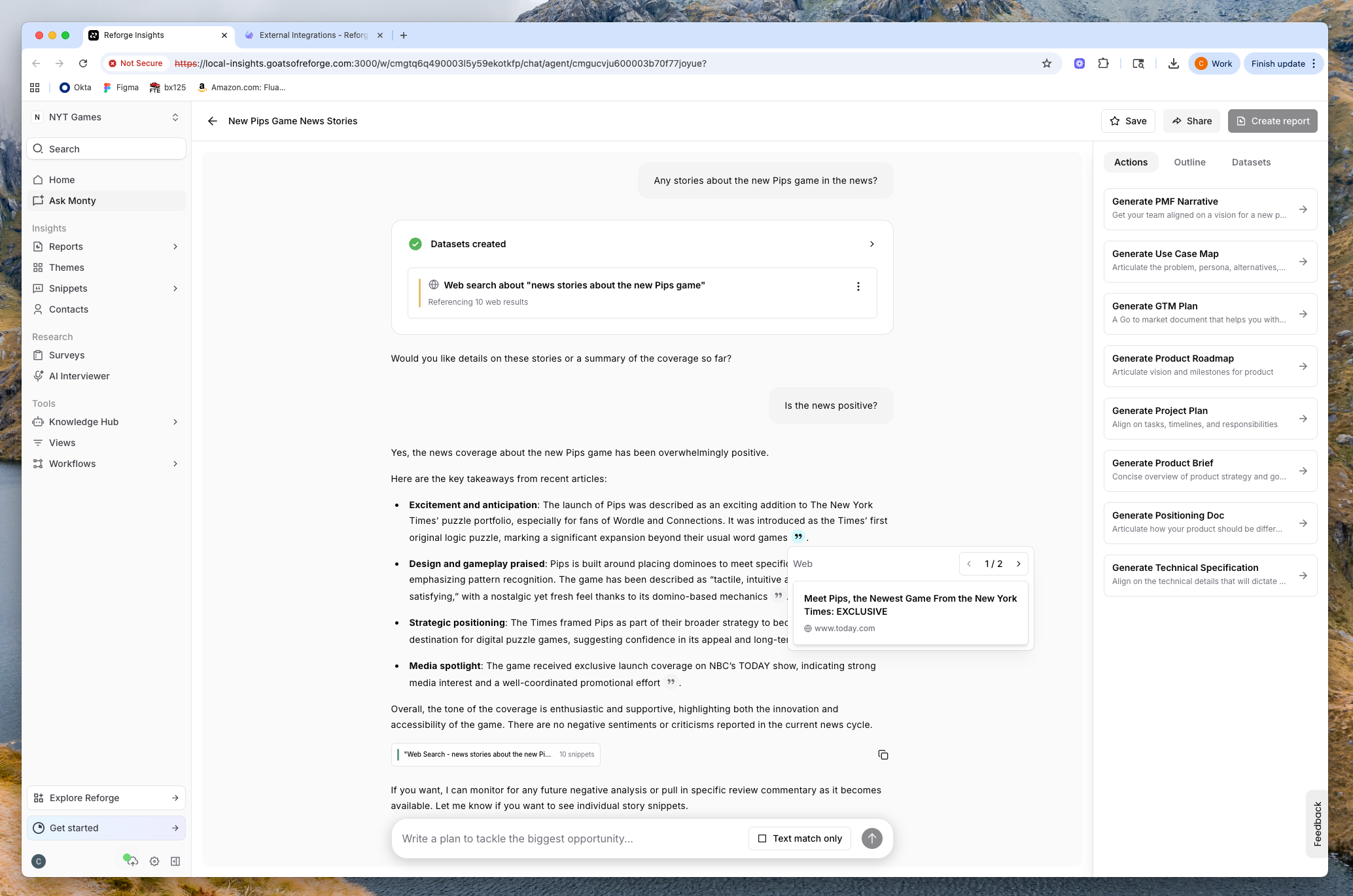 ### Use Cases
**Launch Monitoring:**
```
"Search the web for news about our [product] launch"
→ Finds recent coverage
→ Shows public reception
```
**Competitive Intelligence:**
```
"What are people saying about [competitor]'s new feature?"
→ Gathers competitive insights
→ Informs strategy
```
**Sentiment Check:**
```
"How is [our feature] being received online?"
→ Shows public discourse
→ Complements internal feedback
```
**Industry Research:**
```
"What are the latest trends in [industry]?"
→ Finds thought leadership and news
→ Provides market context
```
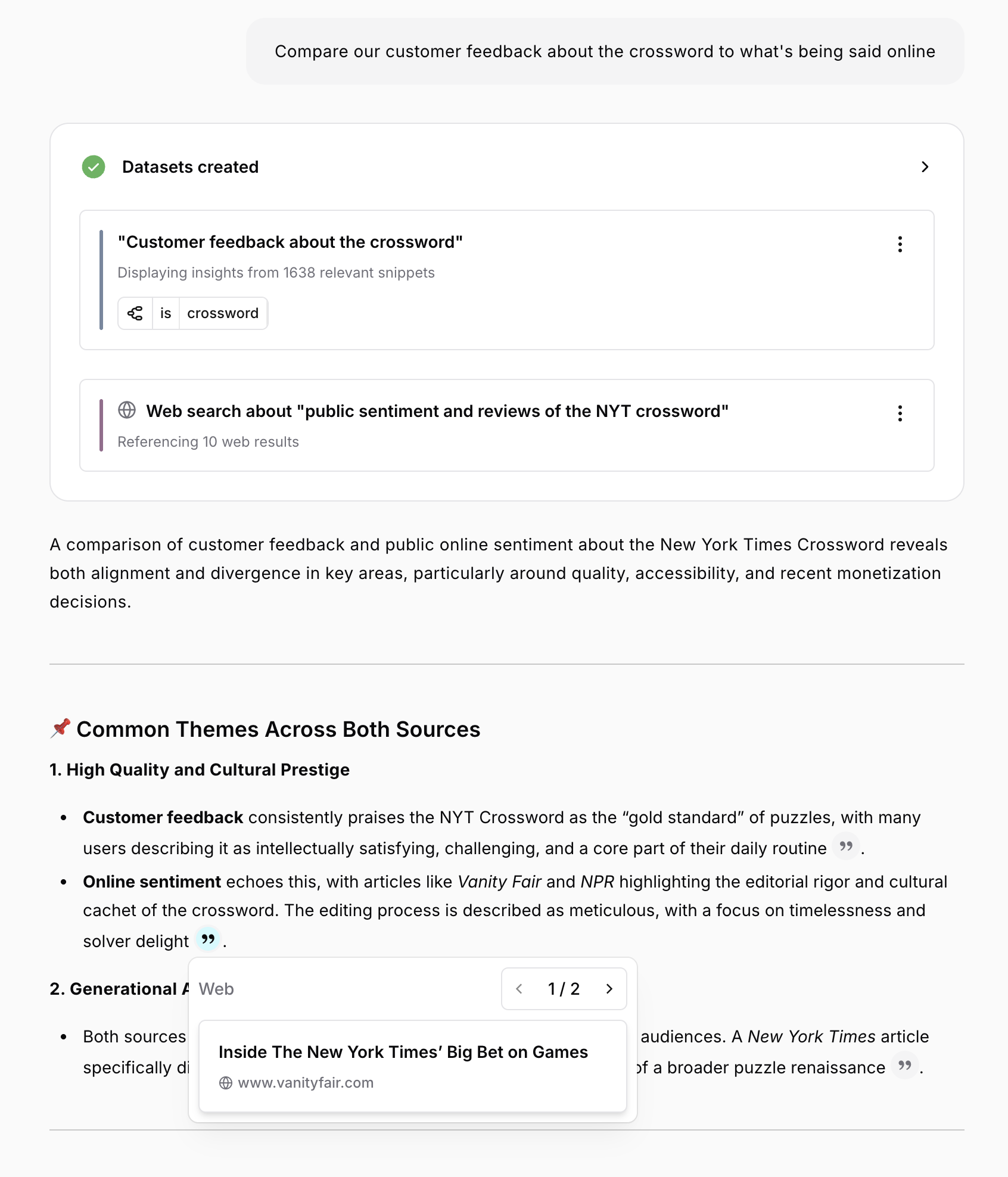
**Validation:**
```
"Compare our customer feedback about [issue] to what's
being said online"
→ Dataset 1: Internal customer feedback
→ Dataset 2: Web search results
→ Shows if internal feedback aligns with public perception
```
### Use Cases
**Launch Monitoring:**
```
"Search the web for news about our [product] launch"
→ Finds recent coverage
→ Shows public reception
```
**Competitive Intelligence:**
```
"What are people saying about [competitor]'s new feature?"
→ Gathers competitive insights
→ Informs strategy
```
**Sentiment Check:**
```
"How is [our feature] being received online?"
→ Shows public discourse
→ Complements internal feedback
```
**Industry Research:**
```
"What are the latest trends in [industry]?"
→ Finds thought leadership and news
→ Provides market context
```
**Validation:**
```
"Compare our customer feedback about [issue] to what's
being said online"
→ Dataset 1: Internal customer feedback
→ Dataset 2: Web search results
→ Shows if internal feedback aligns with public perception
```
 ## External Data Limitations
### Time Ranges
* **GitHub**: Maximum 60 days of history
* **Jira**: Maximum 60 days of history
* **Linear**: Maximum 60 days of history
* **Web search**: Recent results prioritized
* **Feedback**: No time limits
If you request longer ranges, Monty will use the maximum available and inform you.
### Data Freshness
External data is fetched in real-time when you ask, but:
* Recent activity may take minutes to appear
* Historical data depends on integration setup date
* Web search shows indexed content (may lag by hours/days)
### Access Requirements
External integrations must be connected and authorized:
* **GitHub**: Repository access configured
* **Jira**: Project access configured
* **Web search**: No special setup needed
If an integration isn't available, Monty will let you know.
## Best Practices
External integrations work best when combined with internal customer feedback. Don't just ask "What GitHub issues are open?"—instead, compare open GitHub bugs to customer-reported bugs to see which customer pain points have engineering attention.
Use multi-source queries for comprehensive analysis: "Create a monthly product health report including customer feedback, development work, and public sentiment." This gives stakeholders a complete picture across all data sources.
Validate assumptions by connecting dots between sources. Ask "Is the payment issue customers are reporting in GitHub?" to check if customer pain has corresponding engineering work. Monitor launches holistically with queries like "Analyze the \[feature] launch including customer feedback, GitHub activity, and web mentions."
Keep time ranges reasonable—under 60 days for GitHub and Jira due to API limitations. Time-bound your analysis: "What happened in GitHub during the last sprint?" or "Show me web mentions from the past week."
***
**Next:** [Advanced Features →](./advanced-features)
## External Data Limitations
### Time Ranges
* **GitHub**: Maximum 60 days of history
* **Jira**: Maximum 60 days of history
* **Linear**: Maximum 60 days of history
* **Web search**: Recent results prioritized
* **Feedback**: No time limits
If you request longer ranges, Monty will use the maximum available and inform you.
### Data Freshness
External data is fetched in real-time when you ask, but:
* Recent activity may take minutes to appear
* Historical data depends on integration setup date
* Web search shows indexed content (may lag by hours/days)
### Access Requirements
External integrations must be connected and authorized:
* **GitHub**: Repository access configured
* **Jira**: Project access configured
* **Web search**: No special setup needed
If an integration isn't available, Monty will let you know.
## Best Practices
External integrations work best when combined with internal customer feedback. Don't just ask "What GitHub issues are open?"—instead, compare open GitHub bugs to customer-reported bugs to see which customer pain points have engineering attention.
Use multi-source queries for comprehensive analysis: "Create a monthly product health report including customer feedback, development work, and public sentiment." This gives stakeholders a complete picture across all data sources.
Validate assumptions by connecting dots between sources. Ask "Is the payment issue customers are reporting in GitHub?" to check if customer pain has corresponding engineering work. Monitor launches holistically with queries like "Analyze the \[feature] launch including customer feedback, GitHub activity, and web mentions."
Keep time ranges reasonable—under 60 days for GitHub and Jira due to API limitations. Time-bound your analysis: "What happened in GitHub during the last sprint?" or "Show me web mentions from the past week."
***
**Next:** [Advanced Features →](./advanced-features)